 |
DvsenseDriver
1.2.6
The SDK for dvsense products.
|
|
DvsenseDriver
1.2.6
The SDK for dvsense products.
|
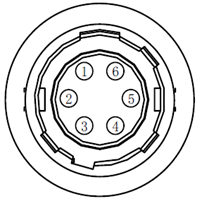
DVSLume, DVSLume-G1, DVSync, and DM3 expose synchronization tools through the SDK. Regular event cameras obtain them through DvsCamera::getTool(), while DVSync uses FusionCamera::getTool(). Refer to the hardware specification of the connected product for its physical connector, cable, and pin definition.
Camera synchronization features include:
| Pin | Signal | Description | Wire Color |
|---|---|---|---|
| 1 | DC5V_OUT | Camera 5V output power | Red |
| 2 | TRIG_IN | Optocoupler trigger input (optically isolated) | Yellow |
| 3 | GPIO_INOUT | Configurable as input or output | Green |
| 4 | TRIG_OUT | Optocoupler trigger output (optically isolated) | White |
| 5 | TRIG_GND | Optocoupler trigger signal ground | Brown |
| 6 | GND | Camera power ground | Black |
Interface Diagram:
Use the frame camera as the master device, connecting the synchronization signal of the frame camera to the Trigger in interface of the event camera.
Enable trigger input through the Trigger In tool. The example below uses a regular event-camera handle; for DVSync, use the fusion-camera handle instead: